When I first started working in the automation equipment space 12 years ago, I thought the "key components" were just the big, shiny robots you’d see on factory floors. I’d visit client sites and hear them say they needed "new automation gear" but had no clue what made that gear actually work. Over the years, I’ve sat through hundreds of conversations with production managers, plant supervisors, and small business owners trying to modernize their lines, and one thing’s become clear: understanding automation’s core parts isn’t just for engineers—it’s the difference between buying equipment that works for you and buying a expensive paperweight. That’s why today, I’m breaking down the key components that every piece of reliable automation equipment has, straight from the supplier who installs, maintains, and troubleshoots these systems every single day. Automation Equipment
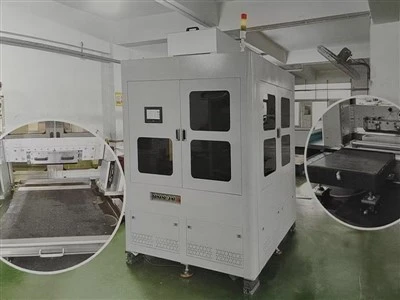
Let’s start with the part that does the physical work—the actuator. This is the component that converts energy (usually electrical, but sometimes pneumatic or hydraulic) into motion, and it’s the backbone of any automation setup. I’ve seen too many clients cut corners here, and it always comes back to bite them. For example, a small automotive parts shop I worked with a couple years ago tried using a cheap, low-torque electric actuator on their assembly line for door handles. Within three months, the actuator was burning out because it couldn’t handle the repetitive lifting and pressing required. We switched it to a heavy-duty servo actuator, and their downtime for that part dropped by 85% within a month. Actuators come in a few main types, too, and picking the right one depends entirely on your application. Electric actuators are perfect for precise, controlled tasks like pick-and-place operations in electronics manufacturing—they let you adjust speed and position down to the millimeter. Pneumatic actuators, which use compressed air, are cheaper for high-speed, high-force jobs like clamping or sorting bulk parts, but they’re less precise than electric. Hydraulic actuators are for the really heavy stuff—like lifting steel beams in construction equipment manufacturing—but they require more maintenance and can leak if not properly sealed. The key here is matching the actuator’s force, speed, and precision rating to your specific task, not just going with the cheapest option on the market.
Next up, the controller—this is the brain of the whole system. Without a controller, actuators and other parts are just metal and wires with no direction. I often explain the controller like the conductor of an orchestra: it sends signals to every other component, tells them when to move, how fast, and in what order. The most common type you’ll find in industrial automation is the PLC, or Programmable Logic Controller. Unlike a regular computer that runs software, PLCs are built to withstand the rough conditions of factory floors—extreme temperatures, dust, vibration—things that would crash a home computer. A few months back, a food processing plant client of ours had a PLC failure that shut down their packaging line over a weekend. Their old controller was a consumer-grade unit they’d repurposed, and it couldn’t handle the daily temperature swings in their unheated warehouse. We swapped it for a PLC rated for industrial environments, added a simple backup power supply, and they haven’t had a controller-related shutdown since. There are also PACs, or Programmable Automation Controllers, which are more flexible than PLCs for complex, multi-task setups—like a line that does both assembly and testing of medical devices. The controller doesn’t just send signals, either; it collects data too. Modern controllers track cycle times, error rates, and component wear, which is why so many of our clients use that data to predict maintenance before a failure happens. That’s a big reason automation isn’t just about replacing workers—it’s about making their jobs easier and lines more efficient.
Then we have the sensors, the eyes and ears of automation equipment. If the controller is the brain, sensors are the input that tells the brain what’s happening in the real world. I can’t count how many times a line stopped because a simple sensor was dirty or misaligned. For example, a warehouse client installing automated guided vehicles (AGVs) to move pallets around their facility had constant collisions with storage racks at first. The issue was their proximity sensors—cheap ones that only detected solid objects within a narrow angle. We upgraded them to laser distance sensors, which can map the entire space around the AGV, and those collisions dropped to zero. Sensors come in every shape and size for every job: photoelectric sensors detect the presence of small parts on a conveyor belt, vision sensors can inspect products for defects like cracks or misprinted labels, temperature sensors monitor heat in motors or ovens in food production, and load sensors measure the weight of materials to ensure they’re being filled correctly. The biggest mistake clients make here is overbuying or underbuying sensors. You don’t need a $500 vision sensor to count parts, just a $20 photoelectric one. But you do need a reliable vision sensor if you’re packaging pharmaceuticals, where even a tiny misprint is a safety hazard. The key is to audit your line’s needs: what do you need the equipment to "see" or "measure" to work correctly? That’ll tell you which sensors are non-negotiable.
No automation system works without a way to connect all these parts, and that’s where the communication network comes in. This is the nervous system of the equipment, sending signals between actuators, controllers, sensors, and even other lines in the same plant. Ten years ago, most systems used proprietary communication protocols, which meant if you had equipment from Brand A, you could only add parts from Brand A. Now, there are open standards like Ethernet/IP, PROFINET, and Modbus that let you mix components from different suppliers, which has been a game-changer for our clients who want to upgrade parts without replacing their entire line. I recently worked with a small electronics manufacturer that had a 10-year-old assembly line from a different supplier. They wanted to add a new vision inspection station, but the old line’s communication protocol was proprietary. We installed a communication gateway that translated signals between the old system and the new sensor, so they could add the inspection without scrapping their existing equipment. That saved them over $100,000 compared to replacing the whole line. The communication network also needs to be reliable—factory floors have a lot of electrical noise from motors and welding equipment, so we always install shielded cables and test for signal interference during setup. If the network drops, the whole line stops, so investing in robust communication isn’t an afterthought—it’s critical.
Then there’s the power supply, the unsung hero of automation equipment. Most people don’t think about this until the power goes out or the supply is too weak, but a good power supply keeps all the other components running smoothly. I’ve seen clients use cheap, unregulated power supplies that cause actuators to move erratically or sensors to give false readings. For example, a metal stamping shop we worked with had problems with their stamping actuator misaligning parts, which caused 10% of their parts to be scrapped. We tested the power supply and found it was delivering inconsistent voltage, especially during peak hours when other machines in the shop were running. Swapping it for a regulated, industrial-grade power supply fixed the misalignment issue entirely, cutting scrap rates in half. Industrial power supplies are designed to handle voltage fluctuations, surges, and temporary outages—many have backup batteries to keep the controller running long enough to save production data and shut down safely during a power cut. It’s a small component, but it’s one of the most important ones for uptime.
Finally, we can’t talk about automation equipment without mentioning the human-machine interface, or HMI. This is what operators use to interact with the system—adjust settings, start or stop lines, view error messages, and track performance. A bad HMI can make even the best automation equipment impossible to use, while a good one makes operators more confident and efficient. I remember a client with a new packaging line that had a clunky HMI with too many buttons and confusing error messages. Operators were spending 15 minutes trying to fix simple issues every shift, leading to lost production. We redesigned the HMI to have large, clear buttons, color-coded error alerts, and a dashboard that showed cycle times and line health at a glance. That cut operator troubleshooting time down to 2 minutes per issue, adding over 8 hours of production time each week. Modern HMIs are touchscreen-based, mobile, and can even send alerts to operators’ phones if there’s a problem, which is great for facilities where operators aren’t always standing right next to the line. The HMI is the link between the technology and the people using it, so it needs to be intuitive for both new and experienced operators.
Now, I know a lot of people read this and think, "Do I need all these components if I’m just starting with a small automation setup?" The answer is no. A simple pick-and-place robot for a small business might just need an actuator, a small PLC, basic proximity sensors, a simple communication network, a regulated power supply, and a basic HMI. You don’t need industrial-grade everything unless you’re running 24/7 heavy production. But what I want you to take away is that each component works together, and skipping even one key part (or cutting corners on a low-visibility part like the power supply or communication network) will lead to problems down the line.
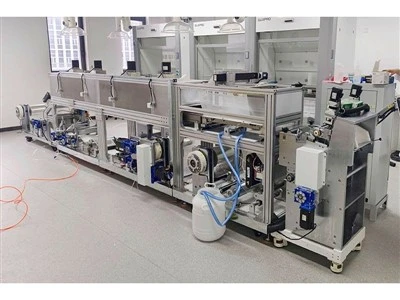
As an automation equipment supplier, our job isn’t just to sell you parts—it’s to help you build a system that fits your specific needs, not a one-size-fits-all setup. We’ve seen every mistake in the book: clients who bought too many expensive sensors they didn’t need, who tried to mix incompatible communication protocols, who cut corners on actuators and ended up paying more in downtime. That’s why we start every project with an audit of your current line, your production goals, and your budget, to recommend exactly the components you need—no more, no less. If you’re considering automating part or all of your production line, or if you have an existing system that’s slowing you down, don’t guess at what components you need. Reach out to our team to discuss your requirements and get a customized solution that keeps your line running efficiently for years to come.
Laboratory Equipment References
- Groover, M. P. (2020). Automation, Production Systems, and Computer-Integrated Manufacturing. Pearson Education.
- International Society of Automation (ISA). (2021). ISA Standards for Industrial Automation and Control Systems.
- Bolton, W. (2019). Programmable Logic Controllers and Industrial Automation. Newnes.
- American National Standards Institute (ANSI). (2022). Safety Standards for Industrial Automation Equipment.
- Rathore, M. M. (2020). Industrial Sensors and IoT in Automation. CRC Press.
Dongguan Innate Intelligent Technology Co., Ltd.
With abundant experience, we are one of the most professional automation equipment manufacturers in China. With a professional production team, we are able to meet the needs of the majority of our customers. Please feel free to buy advanced automation equipment made in China here from our factory. Customized orders are welcome.
Address: Room 201, Building 4, No. 92, Fenghuang Road, Dalingshan Town, Dongguan City, Guangdong Province
E-mail: 13316631159@163.com
WebSite: https://www.getinnater.com/
